Sources checked: . FailSafe Research.
Most mobile pentests focus on the app itself: how it stores data, what its manifest exposes, whether it pins certificates. The bugs that leak customer data are usually somewhere else, in the backend the app talks to and in what the app and the server assume about each other.
That backend is hard to test from the outside. There are no pages to crawl, because the requests are buried in compiled code. Login tokens often expire within minutes. Many apps also tie the session to the device, through attestation, biometrics or a hidden key that signs every request, so a hand-crafted request gets rejected before it reaches anything interesting.
SWARM now tests Android apps by first learning how your system works. You use your app for about five minutes on a cloud Android phone in your browser while SWARM records it. From those recordings and the app's decompiled code, SWARM's agents work out the protocol behind each scenario, build a threat model around it, and attack its weak points on your live staging backend.
How it works
- Upload a test build of your APK with certificate pinning, obfuscation, root detection and attestation turned off, pointed at your staging backend.
- A clean Android device with your app installed opens in your browser. Sign in and go through the scenarios you care about, such as a payment, an invite or a role change. Each one is saved as a labelled recording. Use two accounts if you can, so SWARM's agents can test whether one user can reach another's data (broken object-level authorization, or BOLA) or do what only an admin should (privilege escalation).
- SWARM shows the hosts your app talked to, and you pick the ones SWARM's agents are allowed to test.
- Press Run.
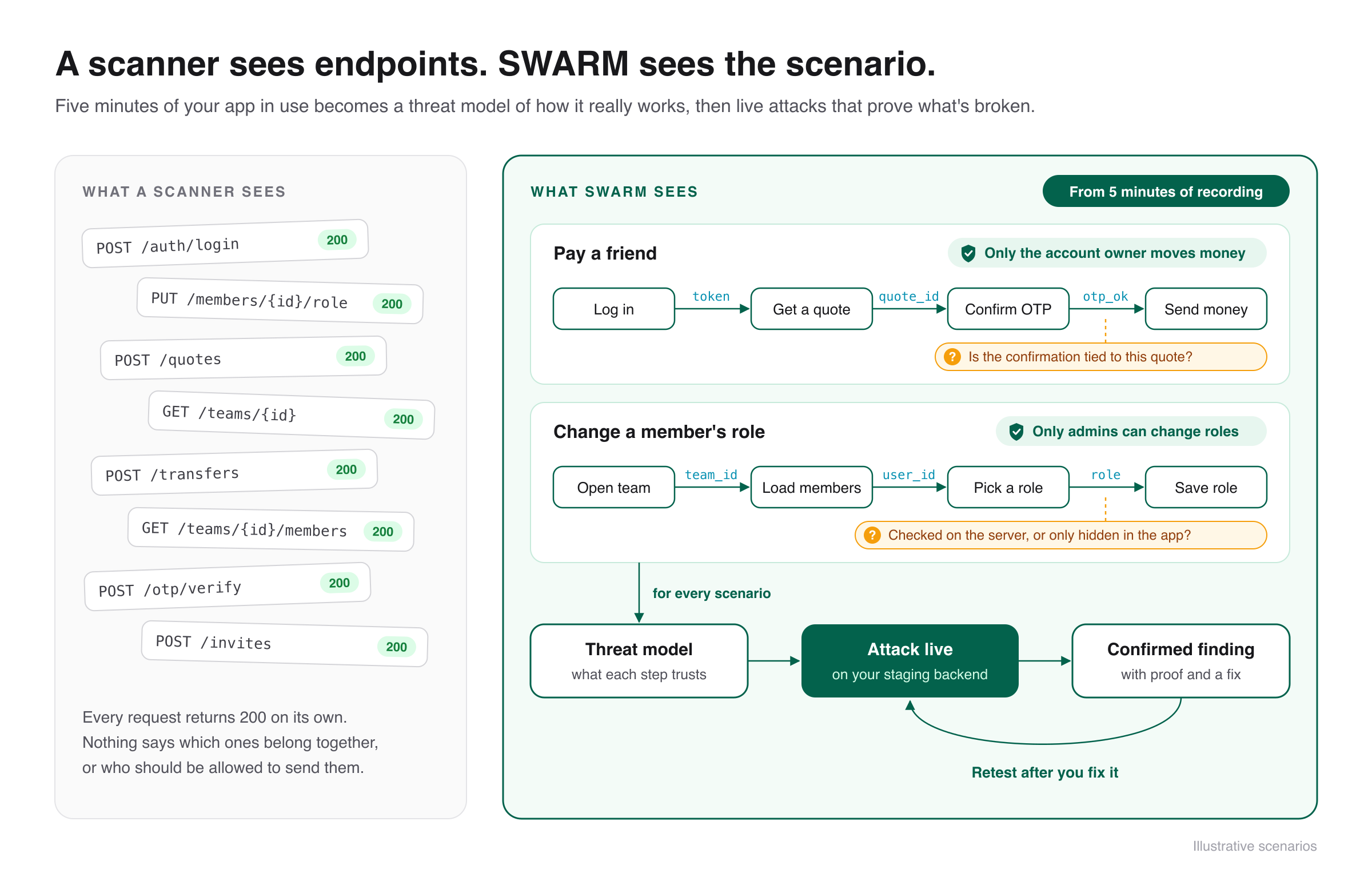
Each recording captures one scenario end to end: every request and WebSocket message between the app and your servers, decrypted and in order. From it the agents can see which calls happen in which order, which values one step hands to the next, and where the session and the user's identity come from.
From recording to attack
Each recording gets its own flow agent, which works in three stages.
- Reconstruct the protocol. The agent reads the recorded exchanges together with the decompiled app. The traffic shows what was sent; the code shows what each value means, where it comes from and how it is signed. The agent also gets everything the backend agents have already learned about the endpoints the scenario touches.
- Threat-model the scenario. It works out what the scenario is meant to guarantee: only the owner moves the funds, only invited members join the channel, a key is shared only with a party the user trusts. Then it goes through the sequence step by step and asks what each step trusts. Often the answer is that the client hid a button, that an ID cannot be guessed, that a value was set on an admin screen, or that a key really belongs to the server.
- Attack it live. Each assumption that might not hold becomes a concrete attack with ordered steps and a pass/fail check. A second agent runs it against your staging backend as the low-privilege user, carrying what each step produces (a leaked ID, a token, a raised role) into the next. A multi-step attack only counts if the whole chain reaches the impact.
Two more groups of agents work alongside the flow agents:
- Backend agents run first. This is the same SWARM engine that tests web apps and APIs, fed with your recordings. They test the whole API for broken authorization, injection and authentication flaws, and pass what they learn to the flow agents.
- A static agent reads the decompiled app for problems on the device, such as hardcoded secrets, tokens in insecure storage and weak crypto, and for logic the app gets wrong by itself, like a client deciding something only the server should.
Findings from all three are deduplicated and attacked live before they reach your report. Problems that exist only in the app's code are checked against the code. The things you switched off for testing, like certificate pinning, are not reported back to you as vulnerabilities.
The report is not the end of it. Each confirmed finding comes with remediation guidance, and SWARM skills help your team fix the bug. Retesting is just as easy: once a fix is on staging, SWARM reruns the attack on the finding and confirms whether it is closed.
Bugs that hide between the steps
The flow agents are built to find bugs that live in the sequence of a scenario, such as:
- Authorization done by the app, not the server. The app hides "make admin" from ordinary users, and the server never checks who sent the request.
- A check on one step, the action on another. The server confirms you own the quote at step 1, then step 2 pays out whatever quote ID you send.
- Steps that can be skipped or replayed. Go straight to "confirm transfer" without the OTP step, or send a one-time confirmation twice.
- Values the client should not decide. A price, role, recipient or account ID set by the app and accepted as is.
- Signatures that miss the field that matters. The request is signed, but the signature leaves out the amount, so the amount can be changed.
To a scanner, each of these is just a request that succeeded. You only see the problem if you know what the scenario was supposed to allow.
What you get
- Reproduced evidence for each confirmed finding, tied to the tested build and staging configuration.
- Remediation guidance, with SWARM skills available to help your team fix the issue.
- A retest of the original attack after the fix, with the permitted control case recorded.
- Controls disabled for testing, such as certificate pinning, are not reported back as vulnerabilities.
Try it
SWARM mobile testing is available now for Android. Bring a test APK, a staging backend and the scenarios that matter. The mobile penetration testing page covers scope, access and the evidence package. Get in touch to set up a run.
The rules-of-engagement guide covers authorization and stop conditions. The application and API testing scope covers the surrounding web and infrastructure surface.
Scope and limits
This is a product capability announcement. It does not claim a specific detection rate, customer outcome or coverage of every mobile platform. Android is supported now; other platforms should be discussed with the team. Results depend on the test build, staging configuration, allowed hosts and the scenarios recorded.
Questions & answers
Questions about this topic
Direct answers to common questions about this page.
It starts from a real user journey such as a payment or role change. SWARM records the requests and WebSocket messages behind the scenario, reconstructs the protocol and tests whether the backend enforces what the scenario should guarantee.
A scanner sees individual endpoints. Many mobile bugs appear in the sequence, such as a check on one step and the action on another, or a client-supplied value the server accepts. The flow agents test those assumptions and require the full chain to reach the impact.
An APK pointed at staging, with certificate pinning, obfuscation, root detection and attestation turned off for the test. Those disabled controls are not reported as vulnerabilities.
Android is available now. Talk to the team about other platforms and scope.
Once a fix is on staging, SWARM reruns the original attack against the finding and records whether it is closed.
Related Articles
BOLA testing: evidence for object-level API authorization
An API BOLA assessment should establish whether a permitted user can access another owner's object, using synthetic accounts and an explicit ownership policy. A...
Vanta and Pillar Security: Testing Evidence Is Not Compliance Evidence
Vanta's agreement to acquire Pillar Security connects agent testing to GRC workflows. Buyers should ask which evidence proves an attack was stopped....
Picus Autonomous Pentesting: What Independent ACOST Validation Must Prove
Picus launched autonomous penetration testing on 12 November 2026. Compare its agent-swarm claims with independent, full-stack validation and verified closure....
Put this guidance to work
Bring the app, staging backend and scenarios. FailSafe can agree the allowed hosts, evidence and stop conditions before the run.
Startup offer: $999 USD for 250 credits and one authorized black-box run. Sign in to SWARM before Stripe checkout. Custom scope and sovereign deployments are separate.