No pages to crawl
The API surface is not discoverable from a browser. Endpoints are called from compiled code, often behind an SDK.
Mobile penetration testing
Most mobile findings are not in the app binary. They sit in the backend the app talks to, and in what the app and server each assume about the other. SWARM records a real user journey on an Android device, reconstructs the API protocol and attacks the weak points on your staging backend.
Android is available now. Mobile scope, a test build and staging access are agreed separately from the $999 first-pentest offer.
What SWARM sees
Five minutes of your app in use becomes a threat model of how it works, then live attacks that prove what is broken.
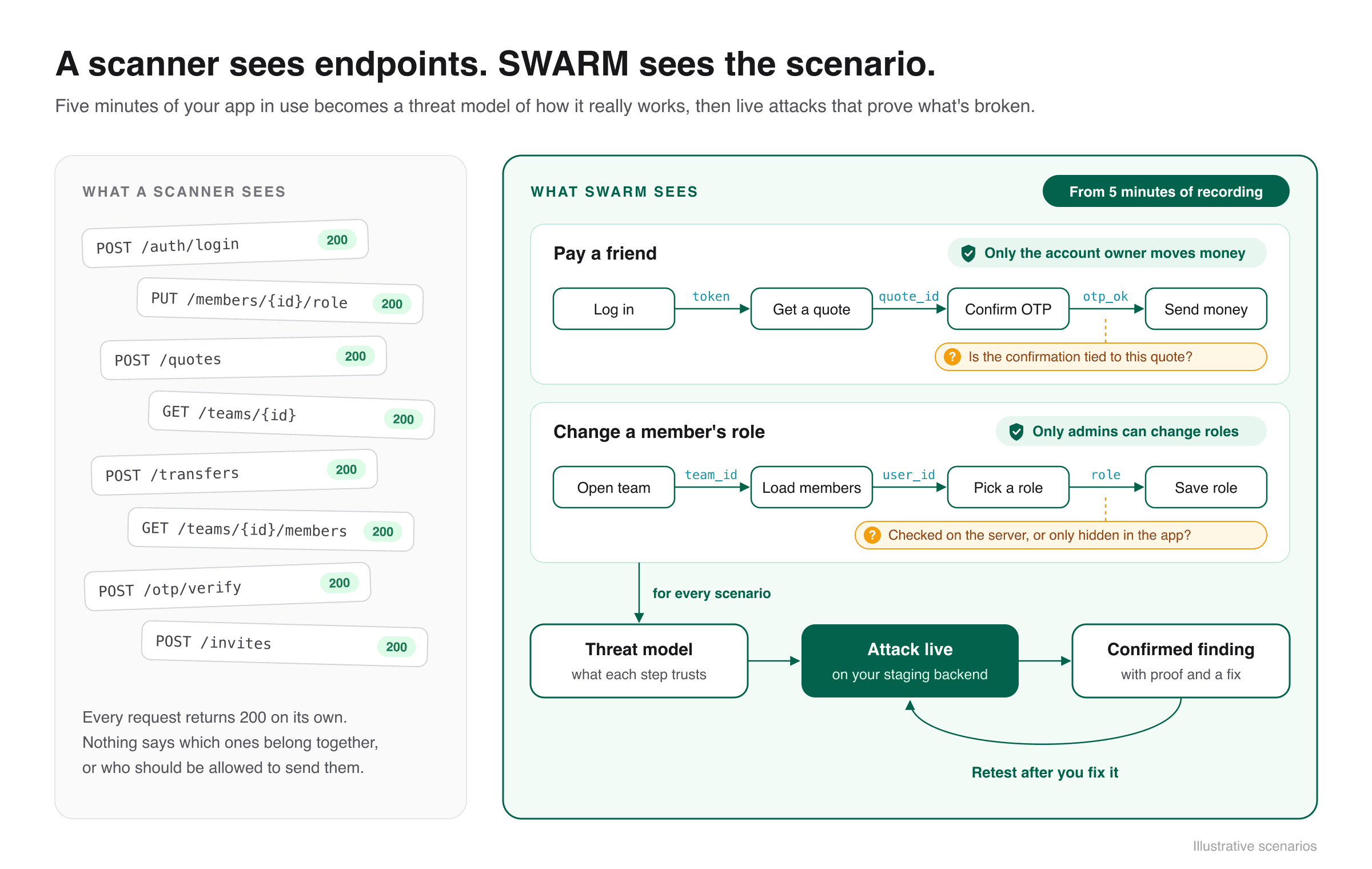
The gap
Traditional mobile testing starts with the app. The bugs that leak customer data usually live in the backend and in the assumptions between the two.
The API surface is not discoverable from a browser. Endpoints are called from compiled code, often behind an SDK.
Tokens expire quickly. Attestation, biometrics or a device key can sign every request, so a hand-crafted call is rejected before it reaches anything interesting.
A scanner sees each call on its own. The risk often appears in the order: a check here, an action there, and a value passed between them.
How it works
Provide an APK pointed at your staging backend, with certificate pinning, obfuscation, root detection and attestation turned off for the test.
A clean Android device opens in your browser. Sign in and go through the scenarios you care about, such as a payment, invite or role change. Use two accounts where possible so the agents can test cross-user access.
SWARM shows the hosts the app contacted. You choose which ones the agents are allowed to test.
Each labelled recording captures every request and WebSocket message for that scenario, decrypted and in order. The agents build the protocol, the threat model and the attacks.
From recording to attack
01
The flow agent reads the recorded exchanges with the decompiled app. Traffic shows what was sent; code shows what each value means, where it comes from and how it is signed.
02
It works out what the scenario must guarantee, then asks what each step trusts. Often the answer is a hidden button, an unguessable ID or a value set on an admin screen.
03
Each assumption becomes an ordered attack with a pass or fail check. A second agent runs it against the staging backend as the low-privilege user and carries each step's output into the next.
The same SWARM engine that tests web apps and APIs is fed with your recordings. It tests the whole API for broken authorization, injection and authentication flaws, then passes what it learns to the flow agents.
It looks for hardcoded secrets, tokens in insecure storage, weak cryptography and client-side logic that only the server should decide.
What other testing misses
The app hides an admin action from ordinary users, and the server never checks who sent the request.
The server confirms ownership at step one, then pays out whatever object ID the next step sends.
Go straight to the confirmation without the OTP step, or send a one-time confirmation twice.
A price, role, recipient or account ID set by the app and accepted by the server.
The request is signed, but the signature leaves out the amount, so the amount can be changed.
To a scanner, each of these is just a request that succeeded. You only see the problem if you know what the scenario was supposed to allow. The launch post walks through the recording-to-attack method in more detail.
What you receive
Findings from the flow, backend and static agents are deduplicated and attacked live before they reach your report.
The engagement needs an authorized target, a test APK and staging access. Use two test accounts where possible so the agents can check cross-user and admin boundaries. Agree the allowed hosts, stop conditions and evidence handling before the run.
Try it
Bring the app, the staging backend and the scenarios that matter. We will agree the scope, the allowed hosts and the evidence before the first run.
Mobile scope is confirmed separately. The Startup offer covers one authorized black-box run and 250 credits.
Sources and scope
This page describes the SWARM mobile testing method and the access it requires. It does not claim a detection rate, a customer outcome or coverage of every platform. Results depend on the test build, staging configuration, allowed hosts and recorded scenarios. Android is the supported platform at publication.
By FailSafe Product. Editorial update: .
Cite this page: FailSafe Product, https://getfailsafe.com/mobile-pentesting, updated .
Questions & answers
Mobile app testing scope, recordings, platforms, evidence and retest.
It starts from a real user journey in the app, such as a payment, invite or role change. SWARM records the requests and WebSocket messages behind that scenario, reconstructs the protocol and tests whether the backend enforces what the scenario is supposed to guarantee.
A scanner sees individual endpoints and often reports a successful response. SWARM learns the order of the calls, the values passed between steps and the identity behind them, then attacks the assumptions the sequence relies on. A finding only counts when the full chain reaches the impact.
Yes. Provide a test build pointed at your staging backend, with certificate pinning, obfuscation, root detection and attestation turned off for the test. Those controls are recorded as disabled for testing and are not reported back as vulnerabilities.
SWARM mobile testing is available now for Android. Talk to the team about other platforms, scope and access requirements.
Each labelled recording captures the requests and WebSocket messages between the app and your servers for that scenario, decrypted and in order. You choose which hosts the agents are allowed to test before a run.
No. A static agent checks the decompiled app for hardcoded secrets, insecure token storage, weak cryptography and client-side logic that should be enforced on the server. The scenario testing adds the backend and sequence coverage that a device review does not provide.
Once a fix is on staging, SWARM reruns the original attack against the finding and records whether it is closed. The report also includes remediation guidance.
The Startup offer covers one authorized black-box run with 250 credits. Mobile scope, a test build and staging access are agreed separately. Confirm fit with the team before purchasing.